Nov 4, 2020

API Testing 'A Beginners View': JavaScript - Array.prototype.find() and Array.prototype.findIndex()

Array.prototype.find()

The find() method returns the value of the first value of the array to be tested which passes the condition specified. It checks all the values in the array and whichever value satisfies the condition first would be picked and displayed in the output. If the value is not found it returns undefined.


Let's check out some examples to understand it better;


Example1:  Using Arrow Function

Response Body:

{
"args": {},
"data": {
"FirstName": [
{
"value": "{{RandomFirstName}}"
}
],
"Specialty": [
{
"name": "NEUROLOGY",
"experience": "2"
},
{
"name": "Dermatology",
"experience": "2"
},
{
"name": "Ortho",
"experience": "2"
}
]
},
"files": {},
"form": {},
"headers": {
"x-forwarded-proto": "https",
"x-forwarded-port": "443",
"host": "postman-echo.com",
"x-amzn-trace-id": "Root=1-5fd86d42-7d196eb86048629c2b3ea2ca",
"content-length": "288",
"content-type": "application/json",
"user-agent": "PostmanRuntime/7.26.8",
"accept": "*/*",
"cache-control": "no-cache",
"postman-token": "065034d3-4e05-4d1b-872d-382f2579524d",
"accept-encoding": "gzip, deflate, br",
"cookie": "sails.sid=s%3A6n5cRYOmPZd0CgxhkfCCHO6rFlTzSFfw.9ZTgkbZcBTzwWSiBLXKE%2BktjLAb6IdSuIMFNxLxnK9Y"
},
"json": {
"FirstName": [
{
"value": "{{RandomFirstName}}"
}
],
"Specialty": [
{
"name": "NEUROLOGY",
"experience": "2"
},
{
"name": "Dermatology",
"experience": "2"
},
{
"name": "Ortho",
"experience": "2"
}
]
},
"url": "https://postman-echo.com/post"
}


Test Script:

//Using function how to find an object in array by 'find' method
var resp = JSON.parse(responseBody);
function find_result1(value) { 
  return value.name === 'Dermatology';
}
console.log(array_value.find(find_result1));

Console Output:


Example 2: Using function how to find an object in array by 'find' method

Test Script:

var resp = JSON.parse(responseBody);
console.log(resp);
const array_value = resp.data.Specialty;
console.log(array_value);
//Using arrow function how to find an object in array by 'find' method
const result = array_value.find( ({ name }) => name === 'NEUROLOGY' );
console.log(result);

Console Output:


The explanation for the above examples:

The above example is based on an array that has three values to it as below:

I have used the ‘find’ method in two different ways to identify the object that satisfies the conditions:

  • name === 'NEUROLOGY'
  • name === 'Dermatology'

After execution, the output returns the value which satisfied the condition.


Array.prototype.findIndex()

In continuation of the above feature, if we need to know the index of the element that we found, this can be done by the findIndex() method. It returns the index of the first element in the array that satisfies the condition we provide. If no element passes the test condition, it returns -1.


Example: In continuation to the above snippet when we add the below code, index will be returned

//How to find the index of the result

//Using function how to find an object in array by 'find' method
function find_result1(value) { 
  return value.name === 'Dermatology';
}
console.log(array_value.find(find_result1));
console.log(array_value.findIndex(find_result1)); //this is using function

Console Output:


Hope this was useful 😇
Happy Learning 😇

Oct 26, 2020

API Testing 'A Beginners View': JavaScript - Array.prototype.length

"length" is a property of arrays in JavaScript. It returns the number of values in an array. 

The value returned by this property is always an integer. We can define the length property to an array at any time. When we extend an array by changing its length property, the number of actual values increases; for example, if we set length to 4 when it is currently 3, the array now contains 4 values, which causes the third value to be a non-iterable empty holder.


Example:

Response Body:

[ { "type": "configuration/entityTypes/HCP", "tags": [ "FCQA", "Jency Test Data", "Integration Testing" ], "attributes": { "Country": { "value": "Brazil" }, "TypeCode": { "value": "Nurse" }, "FirstName": { "value": "Kilian" }, "LastName": { "value": "Lethley" }, "Prefix": { "value": "MR." }, "Gender": { "value": "Male" }, "StatusIMS": { "value": "Active" }, "PresumedDead": { "value": "false" }, "InternationalHCP": { "value": "FALSE" }, "ClinicalTrials": { "value": "false" }, "PrivacyPreferences": [ { "value": { "OptOut": { "value": "false" }, "AllowedToContact": { "value": "false" }, "PhoneOptOut": { "value": "false" }, "EmailOptOut": { "value": "false" }, "FaxOptOut": { "value": "false" }, "VisitOptOut": { "value": "false" }, "TextMessageOptOut": { "value": "false" }, "MailOptOut": { "value": "false" }, "RemoteOptOut": { "value": "false" }, "OptOutOneKey": { "value": "false" }, "KeyOpinionLeader": { "value": "false" }, "ResidentIndicator": { "value": "false" } } } ], "Specialities": [ { "value": { "SpecialtyType": { "value": "Primary" }, "Specialty": { "value": "ANESTHESIOLOGY" }, "Rank": { "value": 1 }, "PrimarySpecialtyFlag": { "value": "true" } } } ], "ValidationStatus": { "value": "Valid" }, "IsBlackListed": { "value": "false" }, "RequiresAttention": { "value": "false" }, "TriggerDCR": { "value": "false" }, "Address": [ { "value": { "PrimaryAffiliation": { "value": "TRUE" }, "AddressType": { "value": "Shipping" }, "Country": { "value": "Brazil" }, "AddressLine1": { "value": "100 Main Street" }, "City": { "value": "Rio de Janeiro" }, "StateProvince": { "value": "RJ" }, "Zip": [ { "value": { "Zip5": { "value": 10000 } } } ], "VerificationStatus": { "value": "Partially Verified" }, "ValidationStatus": { "value": "Valid" }, "Status": { "value": "Active" }, "AVC": { "value": "P22-I44-P2-100" } } } ] } } ]


Test Script:

var resp = JSON.parse(responseBody);
console.log(resp);
for (var i = 0;i<resp[0].tags.length;i++
{
    console.log("Length of vaultID's array is: " + resp[0].tags.length);
    console.log("Index Value during iteration is: " + i);
}

Console Output:

In the above example, based on my JSON response, I have used the length property on array "tags", it's clear from the console output that the length of the array is 3 and in each iteration, the index value is printed correctly as in the screenshot.


Happy Learning 😇


Oct 19, 2020

API Testing 'A Beginners View': JavaScript unshift() Method

The unshift() method adds one or more values at the start of an array. If multiple values are passed in parameters, then all values are inserted at once at the beginning of the array, by the same order the parameters were passed.


Syntax

arr.unshift(value1[, ...[, valueN]])


Parameters

valueN: The values that need to be added in front of the array.


Example:

Response Body:


Test Script:

var resp = JSON.parse(responseBody);

//API Testing 'A Beginners View': JavaScript unshift() Method
accept_encoding = [];
var split = "gzip, deflate, br";
var split_value = split.split(",");
console.log("accept-encoding is: " + split_value);
accept_encoding.push(`${split_value[0]}`);
console.log(accept_encoding);
accept_encoding.push(`${split_value[1]}`);
console.log(accept_encoding);
accept_encoding.push(`${split_value[2]}`);
console.log(accept_encoding);
accept_encoding.unshift("Array First Element");
console.log(accept_encoding);
accept_encoding.unshift("Array Second Element");
console.log(accept_encoding);
accept_encoding.unshift("Array Third Element");
console.log(accept_encoding);
pm.environment.set("Unshift_Values", (accept_encoding));


Console Output:


In the above example, I used the previous post split() method (https://softwaretestingcafebyjency.blogspot.com/2020/10/JavaScript-split-Method.html) and continued to add the unshift() method to append more values at the start of the array. The accept_encoding.unshift()method is used to add values at the start of the array ‘accept_encoding’.


Important Notes:

Invoking unshift with n values all at once, or invoking it n different times with 1 value at a time will not yield the same results.


Let me explain with examples.

Snippet 1:

entityArr = [];
    var split = "entities/1atqyUfo";
    var split_value = split.split("/");
    console.log("Splited values are: " + split_value);
    entityArr.push(`${split_value[1]}`);
    console.log(entityArr);

Console Output '1' will look as below:

Splited values are: entities,1atqyUfo

(1) ["1atqyUfo"]

Based on the above snippet, here the push() method will push the value of index 1 from the splitted string to array entityArr and output would be as ["1atqyUfo"] as seen in the output section.


To this, if I add the unshift() method as below:

Snippet 2:

entityArr = [];
    var split = "entities/1atqyUfo";
    var split_value = split.split("/");
    console.log("Splited values are: " + split_value);
    entityArr.push(`${split_value[1]}`);
    entityArr.unshift("Array Begin");
    console.log(entityArr);

Console Output now will be as below:

Splited values are: entities,1atqyUfo

(2) ["Array Begin", "1atqyUfo"]

Here the unshift() method will add the string ‘Array Begin’ to the start of the array as seen in the output section.


Again if I add multiple values all at once to the same array using unshift() method as below, look how my console output will change:

Snippet 3:

entityArr = [];
    var split = "entities/1atqyUfo";
    var split_value = split.split("/");
    console.log("Splited values are: " + split_value);
    entityArr.push(`${split_value[1]}`);
    entityArr.unshift("Array Begin");
    entityArr.unshift("Value1","Value2","Value3");
    console.log(entityArr);

Console Output now will be as below:

Splited values are: entities,1atqyUfo

(5) ["Value1", "Value2", "Value3", "Array Begin", "1atqyUfo"]

Here the multiple values are added to the start of the array as we passed with unshift() method.


Now comes a twist, let’s pass few more values one by one again to the same array as below:

Snippet 4:

entityArr = [];
    var split = "entities/1atqyUfo";
    var split_value = split.split("/");
    console.log("Splited values are: " + split_value);
    entityArr.push(`${split_value[1]}`);
    entityArr.unshift("Array Begin");
    entityArr.unshift("Value1","Value2","Value3");
    entityArr.unshift("Value4");
     entityArr.unshift("Value5");
      entityArr.unshift("Value6");
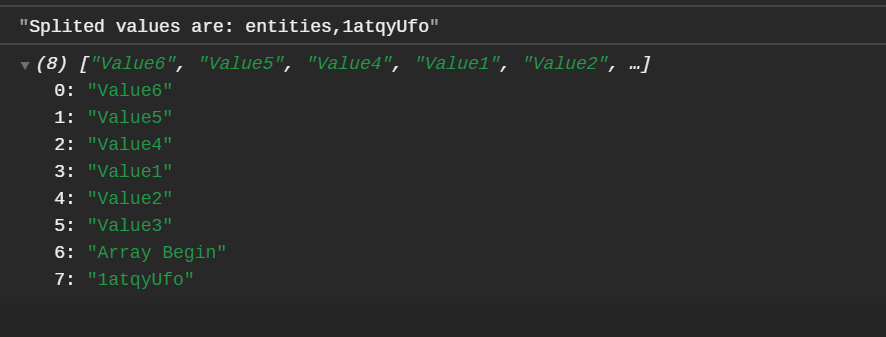
    console.log(entityArr);

Console Output now will be as below:

Value is inserted first come first shift basis.

Hope this clarified the unshift() method more clearly.


Happy Learning 😇


Oct 17, 2020

API Testing 'A Beginners View': JavaScript shift() Method

The shift() method removes the first element from an array and returns that removed value. The shift method removes the element at the zeroeth index and shifts the values at consecutive indexes down, then returns the removed value. If the length property is zero, it returns the output as 'undefined'.


Syntax:

arr.shift()


Return value:

The removed element from the array. If the array is empty value returned is undefined.


Explanation with Example:

Response Body:


Test Script:

var resp = JSON.parse(responseBody);

//API Testing 'A Beginners View': JavaScript shift() Method
accept_encoding = [];
var split = "gzip, deflate, br";
var split_value = split.split(",");
console.log("accept-encoding is: " + split_value);
var shift_value = split_value.shift();
console.log(shift_value);
var shift_value = split_value.shift();
console.log(shift_value);
var shift_value = split_value.shift();
console.log(shift_value);
var shift_value = split_value.shift();
console.log(shift_value);
var shift_value = split_value.shift();
console.log(shift_value);

Console Output:


In the above example, I have used the previous post on 'split' method (https://softwaretestingcafebyjency.blogspot.com/2020/10/JavaScript-split-Method.html) and continued to add the shift() method to return the first element with the same example. 


The split_value.shift() method is used to return the first element from the string defined.